
SupRip v1.16
Freeware
Vista / Win7 / WinXP
Vista / Win7 / WinXP
SupRip lets you OCR and detect text within subtitles as used by HD-DVD and Bluray movies. You can then save the text as a SRT file to be included in reencoded movies.
Instructions
1. Demux the SUP file from the M2TS
2. Start SupRip
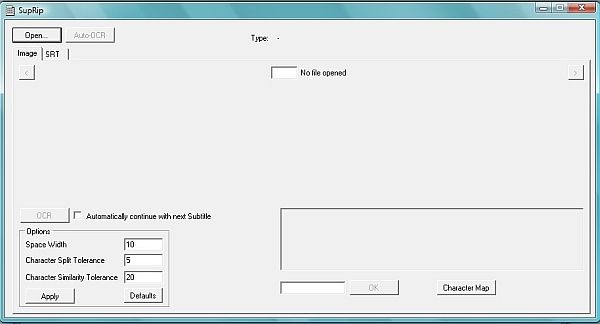
3. Load the SUP file with the "Load" button
4. Mouseover the option fields to see help considering their function
5. Either use "Auto-OCR" to automatically scan the whole file and leave any unknown characters alone, or check "Automatically continue" and press "OCR" to get prompted for any unknown characters
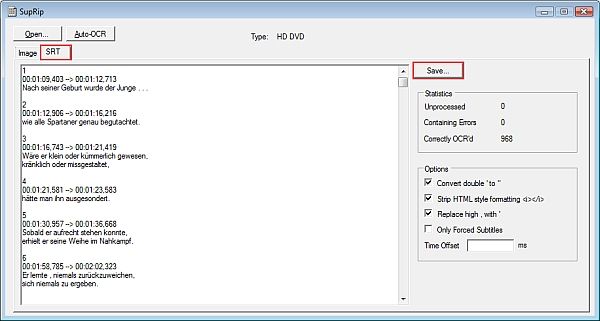
6. Go to the SRT tab
7. Review the subtitles and statistics. Change some options there if you want
8. Save the SRT file with the "Save" button
Instructions
1. Demux the SUP file from the M2TS
2. Start SupRip
3. Load the SUP file with the "Load" button
4. Mouseover the option fields to see help considering their function
5. Either use "Auto-OCR" to automatically scan the whole file and leave any unknown characters alone, or check "Automatically continue" and press "OCR" to get prompted for any unknown characters
6. Go to the SRT tab
7. Review the subtitles and statistics. Change some options there if you want
8. Save the SRT file with the "Save" button
Screenshots:
HTML code for linking to this page:
Keywords:
suprip
ocr
subtitles
srt
License type
Freeware1
Author's homepage
Visit the author's site
Date added
28 Feb 2011
Downloads
2,445
File size
293.48 kB
(<1min @ 1Mbps)
Operating systems
Vista / Win7 / WinXP1
1License and operating system information is based on latest version of the software.
(No user ratings yet)


